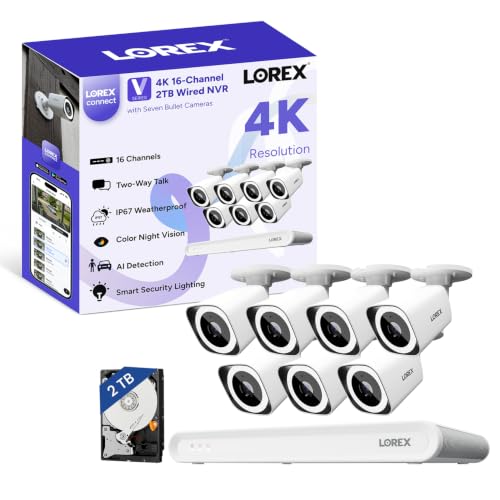
Most security camera buying goes wrong in the same way: somebody buys one good camera, then another, then a third, and ends up with three apps, three battery schedules and a monthly fee per device. A PoE system solves that by inverting the purchase - you buy the recorder and the cameras together, once, and the running cost afterwards is zero. The Lorex V-Series eight-channel kit takes that argument to its logical end by putting seven 4K cameras in the box. Whether that is the right call for you comes down to three things: how many angles you actually need, whether you can run cable, and how much storage you are willing to buy.
Seven cameras is the whole point
The Amazon listing publishes seven 4K (8MP) bullet cameras with a 126-degree diagonal field of view, on an eight-channel recorder that supports up to eight PoE cameras with each channel providing power and data over a single Ethernet cable. That quantity is unusual. Most wired kits at any price ship four cameras, which covers a front, a back and two sides of a normal house and runs out the moment you add a driveway, a side gate, a garage or an outbuilding.
Seven changes what you can cover. A realistic layout is: front door, driveway, back door, patio, each side return, and one on a garage or shed - with the eighth channel left spare for the angle you discover you need in month three. The eighth channel mattering is not a small detail: on a four-camera recorder you are done, and on this one you are not.
Per camera, this is the cheapest 4K coverage we have found. The comparison worth making is not this kit against a single camera but this kit against buying seven cameras separately - which on any cloud platform would also mean seven devices on a subscription. Our best wired security camera systems roundup ranks the field by exactly that arithmetic, and how many security cameras do I need is the page to read before you decide seven is the right number for your property.
The 1TB problem, and why you should fix it on day one
This is the criticism that matters, so it gets its own section. The kit ships with 1TB of storage, expandable to 10TB. One terabyte is a sensible amount of storage for a four-camera 1080p system. It is not a sensible amount for seven cameras recording 4K continuously.
The arithmetic is unavoidable: seven 8MP streams write several times more data per hour than four, and they share one drive. What you get is a recorder that loops - overwriting the oldest footage - in a matter of days rather than the two or three weeks most people assume they have. That is fine if you check footage the same evening something happens. It is a real problem if you come back from a week away and want to see Tuesday.
The fix is cheap relative to the system: buy a surveillance-rated drive at 4TB or more and fit it when you install, rather than discovering the retention window after you need it. Use a drive built for continuous write workloads - a surveillance or NAS drive, not a desktop drive pulled from an old PC, which is designed for occasional bursts and fails early under 24/7 recording. Our guide to how long security cameras keep footage works through retention math for different camera counts, and how much data security cameras use covers the bandwidth side of the same question.
Setup without a monitor is a bigger deal than it sounds
The listing publishes a monitor-less setup mode that enables full system initialization and configuration through the Lorex Connect app without requiring a connected display. If you have never commissioned an NVR, this will sound like a minor convenience. It is not.
Traditionally the recorder needs an HDMI monitor and a mouse to get through first-boot setup - and recorders live in lofts, cupboards, garages and basements, which is exactly where nobody keeps a spare display. Doing the whole thing from a phone standing next to the box removes a genuinely annoying step, and it makes later changes - adding a camera, adjusting a detection zone - something you do from the sofa.
Smart Search is the other software feature worth paying attention to. The listing describes filtering recordings by motion type, color, numbers and more. Retrieval is the unglamorous half of a camera system: recording is easy, and finding the ninety seconds that matter inside a week of seven-camera footage is the part that makes people give up. A filter by motion type and color is a practical answer to that.
What it does not do
Lorex publishes no siren, no two-way talk and no active-deterrence specification for this kit. That is worth stating plainly because the category has drifted: most consumer cameras now shout, flash or sound an alarm, and this one is designed to watch and record. If you want the camera to intervene, this is the wrong product shape and a floodlight camera is the right one - light and a siren at the moment of approach change behavior in a way a recording never will.
There is also no Matter, no Apple Home and no published Alexa or Google integration for the kit. It lives in the Lorex Connect app. For a dedicated recording system that is a defensible trade - you are not going to ask a smart speaker to do anything useful with a seven-camera NVR - but it does mean this system sits outside whatever ecosystem the rest of your house runs on. Our camera ecosystem compatibility guide has the full matrix if that matters to you.
One honesty note on specifications. Lorex's own V-Series pages describe a V5 bullet camera with a 131-degree diagonal field of view, infrared to 82 feet, a multi-color LED light ring and two-way audio with an 85 dB speaker. Those specs belong to a camera SKU in the same line, not necessarily to the seven cameras in this bundle, and the listing for this kit publishes 126 degrees. We report the listing's figures for the kit and flag the rest rather than quietly crediting the better numbers - if a specific spec decides your purchase, confirm the camera model on the listing first.
Installation is the real gate
Seven cameras is seven cable runs, each carrying power and video from the recorder to the camera position. In a house with a loft and soffits that is a methodical weekend. In a house with no route between floors, it is an electrician or an alarm installer, and the install can approach the cost of the kit.
Do the survey before you buy: walk the property, pick the seven positions, and for each one work out where the cable goes and where it enters. If more than one or two positions have no plausible route, a wired system is the wrong answer regardless of how good the value is - and wired vs wireless security cameras is the honest comparison of what you give up by going battery or Wi-Fi instead. What a PoE camera actually is explains the cabling if this would be your first wired system.
One more practical point from Lorex's own documentation: its V-Series page states that camera cables are sold separately, while the same page's included-items list shows Ethernet cables. We could not resolve that contradiction, and it is the kind of thing that turns a Saturday install into a Sunday one. Check what the bundle actually includes - and either way, buy cable in the lengths your survey says you need rather than the lengths that come in a box.
How it compares
Against the Reolink RLK8-800B4, the other eight-channel 4K kit we rate, the trade is cameras against storage: Reolink ships four cameras with a 2TB drive, Lorex ships seven with 1TB. Reolink is the better-balanced system for a normal house and will hold far more footage; Lorex is the better value if you genuinely need seven angles and will upgrade the drive. We put them side by side in Lorex V-Series vs Reolink RLK8-800B4.
Against the eufy PoE NVR E40 and the ANNKE 8CH 4K kit, the same pattern holds - fewer cameras, more storage per stream, and in eufy's case a tighter tie-in with the rest of a eufy system. If you have not committed to a wired system at all, best 4K security cameras covers the standalone options and no-subscription security cameras is the list if avoiding a monthly fee is the main goal - which a local NVR achieves by design.
Who should buy it
Buy it if you own a property that needs six or seven angles, you can run cable, and you would rather spend once than pay monthly. Buy it especially if the alternative you are considering is seven separate cloud cameras, because that comparison is not close on three-year cost. Add a larger surveillance drive at the same time and treat the 1TB as a placeholder.
Skip it if four cameras would cover your property - a four-camera kit with 2TB is the better balanced purchase. Skip it if you rent or cannot run cable. Skip it if you want the cameras to deter rather than record, or if you need the system to appear in Apple Home, Google Home or Alexa. We have not tested this system hands-on: every figure above is taken from the live retail listing and Lorex's own published documentation, read on the dates in the sources below, and the price on this page is live from the listing rather than typed in by us.
What actually decides a PoE system purchase
One: how many angles, honestly. Walk the property and count the approaches a person could use, not the walls you could mount a camera on. Most houses need three to five. Properties with a driveway, outbuildings or a corner plot need more, and that is the only reason to buy a seven-camera kit. Buying coverage you do not need costs you storage as well as money.
Two: the cable route, before the spec sheet. A PoE system is only the best option where cable can reach. Survey each position for a route and an entry point first; if two or more positions have no route, change category rather than buying and hoping.
Three: storage sized to camera count, not to the box. Retention is drive size divided by total bitrate, and total bitrate scales with cameras and resolution. Seven 4K streams need multiples of what four need. Decide the retention window you want in days, then buy the drive that delivers it - and buy a surveillance-rated drive built for continuous writes.
Four: record, or deter? An NVR kit is a witness. A floodlight camera or a siren is a deterrent. The two jobs want different hardware, and the strongest setups do both - a recording backbone plus one lit, sirened camera on the main approach.
Five: retrieval, not just recording. Every system records. The ones you stay happy with let you find a clip. Filtering by motion type, by color, or by a drawn zone is the difference between a useful archive and a hard drive full of wind-blown trees.