Skip to content
Latch & Hub

Cameras · Security Cameras

Wyze Floodlight Camera v2 Review: More Light, More Pixels, No Monthly Fee

The budget floodlight camera that beats the expensive ones on the two specs that actually matter outdoors. Wyze publishes 2K video, 2,800 lumens, a 105 dB siren and 24/7 recording to a microSD card that needs no plan - then hands you 2.4 GHz-only Wi-Fi and a hardwiring job as the price.

By Stephen V.Updated How we choose
#ad

We earn a commission when you buy through our Amazon links, at no extra cost to you. It never changes our rankings — where the subscription-free or cheaper option is the better buy, we say so. How this works.

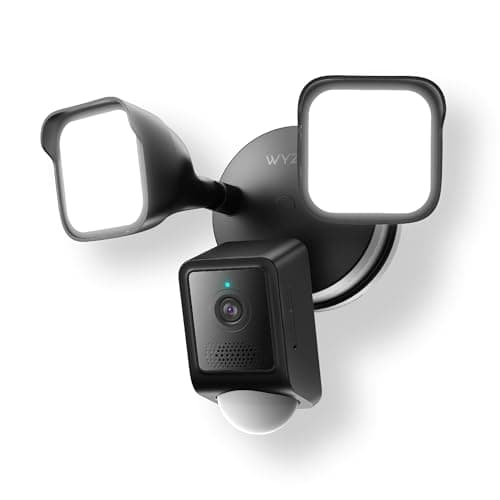
Wyze Floodlight Camera v2

Our top pick

Wyze Floodlight Camera v2

The value pick of the whole floodlight-camera category, and not by a narrow margin: more light and more resolution than the premium fixtures, plus 24/7 local recording that never expires behind a lapsed subscription. You pay for it with a cold 5000 K light you cannot tune, 2.4 GHz-only Wi-Fi and an install that needs a junction box.

Best for: Most driveways and side returns - maximum light and pixels per dollar

$79.99View on Amazon

$99.9820% off

#ad · we may earn a commission from this link to Wyze Floodlight Camera v2

Verdict

The bottom line

The Wyze Floodlight Camera v2 is the floodlight camera we would buy with our own money for a normal driveway, side return or back patio. Wyze publishes 2K video at 2304 x 1296 across a 160-degree diagonal, 2,800 total lumens from two dimmable panels, a 105 dB siren, color night vision, an IP65 body rated from -4 F to 140 F, and 24/7 continuous recording to a microSD card that works with no subscription at all. On the two specifications a floodlight camera exists for - how much light it throws and how many pixels it resolves - it beats fixtures that cost two or three times as much. The compromises are real and worth knowing before you buy: it is 2.4 GHz Wi-Fi only, it needs a junction box with a neutral wire at 110-120 V AC, the 5000 K light is a cold white you cannot adjust, and the AI alert filtering most people eventually want sits behind the optional Cam Plus plan. If you have power where you want the camera and a Wi-Fi network that reaches it, this is the most camera per dollar in the category.

Floodlight cameras are the one home security product where the cheap option can genuinely be the best option, and the Wyze Floodlight Camera v2 is why. The job of a floodlight camera is to throw a lot of light at the moment someone did not expect it and to record what happens next in enough detail to be useful. Wyze publishes more lumens and more pixels than the fixtures that cost two and three times as much, and it records continuously to a card in the camera rather than to a cloud account you rent. That combination is unusual enough that the honest question is not whether it is good value - it plainly is - but what you give up to get there.

2,800 lumens is the headline, and it should be

Wyze publishes 2,800 total lumens from two dimmable LED panels. For context, Ring publishes 2,000 lumens for the Floodlight Cam Wired Plus and Blink publishes 2,600 for its Wired Floodlight. More light does two things at once: it makes the camera record a lit scene in color instead of an infrared monochrome one, and it changes what someone standing in your driveway decides to do next. Of the two, the second matters more and gets written about less.

The light is split across two panels you can dim independently, which is more useful than it sounds. A floodlight camera that only has one brightness setting is either too dim for the driveway or too bright for the bedroom window across the street. Wyze also documents dusk-to-dawn and ambient light modes, so the fixture can double as ordinary porch lighting rather than only firing on motion.

The catch is the color temperature. Wyze publishes 5000 K and its FAQ says the value is not adjustable. 5000 K is a cold, slightly blue white - excellent for a workshop or a yard, noticeably clinical on the front of a house. Ring's 3000 K is the warmer, more domestic choice, and if your fixture is going on the street-facing elevation of a nice-looking house, that difference is the one aesthetic argument against the Wyze. Round the back, nobody cares.

2K is enough resolution to be useful

Wyze publishes 2K at 2304 x 1296 across a 160-degree diagonal field of view, with color night vision. That is roughly three million pixels where the Ring fixture spreads two million across a narrower 140-degree horizontal view. Resolution on a security camera is not about looking good; it is about whether the footage answers a question. At 1080p across a wide outdoor scene you reliably learn that a person approached the door. At 2K you have a materially better chance of describing them, and a much better chance of reading something on a vehicle in the near field.

Do not over-read it either. 2K across 160 degrees is still a wide-angle outdoor camera, and wide angles spend pixels on the edges of the scene. If your actual problem is identifying faces or plates forty feet down a long drive, the honest answer is a narrower, higher resolution camera rather than a brighter floodlight - our 2K vs 4K explainer covers where extra pixels earn their money, and driveway cameras are chosen for exactly that distance problem.

The 270-degree PIR motion zone is the spec most buyers skip and should not. The camera sees 160 degrees; the passive infrared sensor watches 270 degrees out to a published 30 feet. That gap is deliberate and useful: the light and the siren can trigger on someone approaching from outside the frame, which is a meaningfully better deterrent than a fixture that only reacts once a person is already centered in the shot.

The subscription math, which is where it really wins

Wyze supports 24/7 continuous recording to a microSD card - up to 256 GB in exFAT per the spec sheet - and that recording works with no plan. This is the single biggest practical difference between this camera and the premium alternatives, and it is worth being precise about why.

First, continuous beats clips. A camera that records only motion-triggered clips starts the file after something has already moved, which is why so much security footage begins with someone halfway up the path. A card recording continuously has the seconds before the trigger. Second, free beats rented. The Ring fixture works without a plan for live view, alerts, light and siren - but saving and reviewing what it recorded is a subscription feature starting at $4.99/mo on Ring Solo, with Ring Multi at $9.99/mo for every device at one address and Ring Pro at $19.99/mo adding 24/7 professional monitoring. Over three years, one camera on the cheapest Ring plan costs more in fees than the Wyze costs to buy.

Cam Plus is still worth understanding before you dismiss it. Wyze's optional plan buys AI alert filtering - person, package and vehicle detection - plus cloud backup. The free configuration gives you everything recorded and no help sorting it, and on a camera pointed at a street that means a notification every time a car passes. Most people either tune the detection zone carefully or end up paying for the filtering. Our camera subscription cost breakdown has the arithmetic across every brand we cover, and no-subscription security cameras is the roundup if a recurring line on the card is a hard no.

Installation is the real filter

This is a hardwired fixture at 110-120 V AC and it needs a junction box with a neutral wire. There is no battery variant. In practice there are three situations: there is already an outdoor light where you want the camera and this is an hour with the breaker off; there is power nearby and you need an electrician to land a box; or there is nothing there and this is the wrong product. Wyze also sells an optional plug-in mount, which converts the job into running a cable to an outdoor outlet - legitimate, and visibly a cable.

If none of that applies to your wall, read how to power an outdoor security camera before you buy anything, and cameras for renters if you cannot touch the wiring at all. A wired fixture you never think about again is the right answer for a house you own; it is simply not an option everywhere.

2.4 GHz only, and why that is the spec to worry about

Wyze publishes 802.11 b/g/n on 2.4 GHz and its FAQ confirms 5 GHz is not supported. The 2.4 GHz band travels further through walls, which is why budget cameras use it - and it is also where every smart plug, sensor, older printer and neighbor's router already lives. A single camera is fine. A 2K camera recording continuously, plus a doorbell, plus two more cameras, all on 2.4 GHz at the far corner of the property, is how you end up with a camera that keeps dropping offline.

The fix is boring and effective: separate your 2.4 and 5 GHz network names so you can see what is on which band, put the camera on a mesh node rather than the far side of the house, and check the channel. Our smart home WiFi congestion guide walks through it, and why a security camera goes offline covers the diagnosis if it is already happening.

Where it sits against the alternatives

Against the Ring Floodlight Cam Wired Plus it wins on light, resolution, storage cost and voice-assistant breadth, and loses on ecosystem: Ring's fixture arms and disarms with a Ring Alarm and sits in the same app as a Ring doorbell, which no Wyze camera can do. We put them side by side in Wyze Floodlight v2 vs Ring Floodlight Cam Wired Plus. Against the Blink Wired Floodlight it wins on nearly everything measurable - more lumens, 2K against 1080p, a published IP rating and temperature range Blink does not publish at all - which is the subject of Wyze Floodlight v2 vs Blink Wired Floodlight.

The fixture that genuinely out-specs it is the eufy Floodlight E340, which adds a second lens, 360-degree pan and tilt and 8x zoom with local storage and no plan - for roughly double the money. If you want one camera to cover a whole yard rather than one approach, that is the upgrade. The best floodlight cameras roundup ranks the field in order.

Who should buy it

Buy it if you have a junction box where you want a camera, you want the most light and resolution per dollar in the category, and you want footage that stays yours without a monthly fee. Buy it especially if you are adding a second or third angle to a property, because this is the price point that makes a third camera affordable at all. Skip it if you rent or have no power at the mounting point, if your 2.4 GHz network is already saturated, if a cold 5000 K light on the front of the house would bother you, or if you need the camera to arm with a Ring Alarm or appear in Apple Home. We have not tested this unit hands-on: every specification above is Wyze's own published figure, read on the date in the sources below, and the prices on this page are live from the listing rather than typed in by us.

The short answer

Quick picks

Tap any row for the full write-up.

  • Wyze Floodlight Camera v2
    01 Wyze Floodlight Camera v2Top pick

    The value pick of the whole floodlight-camera category, and not by a narrow margin: more light and more resolution than the premium fixtures, plus 24/7 local recording that never expires behind a lapsed subscription. You pay for it with a cold 5000 K light you cannot tune, 2.4 GHz-only Wi-Fi and an install that needs a junction box.

    Best for: Most driveways and side returns - maximum light and pixels per dollar · No Matter - Wyze app plus Alexa and Google Assistant

    $79.99View on Amazon

    $99.9820% off

    #ad · we may earn a commission from this link to Wyze Floodlight Camera v2

#ad · Live prices from the Amazon Product API, as of October 27, 2026. Where we have no verified live price we show none — we would rather leave a gap than print a number that has rotted.

3-year cost of one floodlight camera: free local storage vs a Ring plan (hardware figures are approximate MSRP context as of 2026-10-27; live prices are on the buy buttons)
ProductHardwareMonthly3-yr fees3-yr total
Wyze Floodlight Camera v2 - microSD only2K, 24/7 continuous local recording, no plan required$80$0$0$80
Blink Wired Floodlight - local via Sync Module 2 + USB1080p, and the module plus a USB drive are extra purchases$100$0$0$100
Ring Floodlight Cam Wired Plus - no planLive view, alerts, light and siren only - no saved clips at all$180$0$0$180
Wyze Floodlight Camera v2 + Cam PlusAdds AI person/package/vehicle alerts and cloud backup - Cam Plus at $2.99/mo per camera$80$3/mo$108$188
Ring Floodlight Cam Wired Plus + Ring SoloAdds saved video history for this one device$180$5/mo$180$360

Hardware figures are approximate MSRP context for the comparison; the live, date-stamped price is on each product's buy button. Fees are the published plan rates at the time of writing — always confirm current pricing with the brand.

In detail

The full write-up

01

Wyze Floodlight Camera v2

Top pick
Wyze Floodlight Camera v2
$79.99View on Amazon

$99.9820% off

Price as of October 27, 2026. Amazon's price at checkout is the one that counts.

#ad · we may earn a commission from this link to Wyze Floodlight Camera v2

The value pick of the whole floodlight-camera category, and not by a narrow margin: more light and more resolution than the premium fixtures, plus 24/7 local recording that never expires behind a lapsed subscription. You pay for it with a cold 5000 K light you cannot tune, 2.4 GHz-only Wi-Fi and an install that needs a junction box.

  • 2K, 2304 x 1296; 160° diagonal
  • 2,800 total lumens, 5000 K (not adjustable)
  • 105 dB siren
  • 24/7 local recording to microSD up to 256 GB (exFAT) - no plan required
  • 270° PIR motion detection, 30 ft range
  • IP65; rated -4 °F to 140 °F
  • Hardwired 110-120 V AC, neutral wire required
  • 2.4 GHz Wi-Fi only (802.11 b/g/n)
  • Color night vision; dusk-to-dawn and ambient light modes
  • Alexa, Google Assistant and IFTTT documented
Matter: No Matter - Wyze app plus Alexa and Google AssistantFee: None required - 24/7 microSD recording is free; Cam Plus optional for AI alerts and cloud backupResearched, not hands-on tested

Good

  • 2,800 lumens against the 2,000 Ring publishes and the 2,600 Blink publishes, at a fraction of the price - and light, not resolution, is what actually changes behavior on a driveway at night
  • 2K at 2304 x 1296 where the Ring fixture is still 1080p, which is the difference between knowing someone was there and having footage worth showing someone
  • 24/7 continuous local recording to a microSD card with no plan, so nothing you have already captured is held hostage by a subscription you forgot to renew - and continuous recording catches the seconds before a motion trigger that clip-based cameras miss
  • Wyze now publishes an operating range of -4 F to 140 F alongside the IP65 rating, which is better environmental documentation than Blink offers for its floodlight at all and competitive with Ring's -5 F to 118 F
  • A 270-degree PIR detection zone with a published 30 ft range watches a much wider approach than the camera's own 160-degree view, so the light and siren can fire before anyone is in frame
  • Documented Alexa, Google Assistant and IFTTT support, which makes it the rare budget floodlight camera that fits a Nest-display household as well as an Echo one
  • Two separately dimmable LED panels, plus dusk-to-dawn and ambient light modes, so you can tune the output down if the fixture faces a neighbor's window

Less good

  • 2.4 GHz Wi-Fi only. That is the busiest band in most homes and the one most likely to stutter once you have several cameras, a doorbell and a dozen smart plugs on it - our WiFi congestion guide exists because of cameras like this one
  • The 5000 K color temperature is a cold, blue-white light and Wyze's own FAQ says it is not adjustable. On the front of a house it looks more like a parking lot than Ring's warmer 3000 K, and the only control you have is the dimmer
  • Hardwired at 110-120 V AC with a junction box and a neutral wire required. There is no battery version, so renters and anyone without power at the mounting point should look elsewhere or budget for the optional plug-in mount
  • Local recording is free, but AI alert filtering (person, package, vehicle) and cloud backup sit behind Cam Plus. Without it you get everything recorded and no help triaging it, which on a busy street means a lot of notifications about cars
  • Wyze's own spec sheet and FAQ disagree about the microSD limit - the spec sheet says up to 256 GB in exFAT, the FAQ says 265 GB in exFAT and FAT32. Buy a 256 GB card in exFAT and you are inside both claims
  • No Apple HomeKit and no Matter, so an Apple-first household gets the camera in the Wyze app and nowhere else

Skip it if: you rent, there is no junction box where you want the camera, or your 2.4 GHz network already struggles at the far end of the house - this is a wired fixture on the busiest Wi-Fi band, and no amount of value makes up for a camera that will not stay online.

What actually decides a floodlight camera purchase

One: is there a box there? Every floodlight camera worth buying is a wired fixture, and that single fact decides more purchases than any spec. If an outdoor light already exists where you want coverage, you are choosing between fixtures. If it does not, you are choosing between a battery camera and an electrician, and the spec sheet is irrelevant until you answer that.

Two: lumens before megapixels. Light changes what happens; resolution changes what you can prove afterwards. Both matter, but a bright fixture with a mediocre sensor prevents more than a dim fixture with a great one. Wyze happens to lead on both here, which is why it wins the category on value.

Three: where the footage lives, and who owns it. Local storage on a card costs nothing to keep and is clumsier to review remotely. Cloud storage is effortless and rented, and it disappears when you stop paying. Neither is wrong - but the brand enforces the answer, not you, so decide before you buy. Our local vs cloud comparison lays out how each one fails.

Four: the band your camera will live on.A 2.4 GHz-only camera at the far corner of a property is the single most common cause of the "my camera keeps going offline" complaint. Check signal at the mounting point with a phone before you commit, and plan a mesh node if it is marginal.

Five: whose app the household already opens.Four camera brands means four apps and four notification styles, and the family member who does not care about any of this will only ever learn one. Wyze's app is good and self-contained; it is not Ring, and it is not Apple Home.
How we chose

We don't run a test lab

We don't wire every one of these into a test rig, and we won't write "in our testing" as if we do. What we did instead: pulled each product's published specifications, confirmed its Matter/Thread/HomeKit support from the manufacturer's own documentation, added up the real 3-year cost with any monthly fee included, and read the aggregated verified-buyer sentiment. Every pick is chosen against that published method. Where a number came from someone else, we name and link them in Sources.

Questions

Frequently asked

Does the Wyze Floodlight Camera v2 need a subscription?
No. Wyze supports 24/7 continuous recording to a microSD card - up to 256 GB in exFAT per its spec sheet - and that works with no plan at all. Cam Plus is optional and buys AI alert filtering (person, package, vehicle) plus cloud backup. The practical read: you get all the footage for free and pay only if you want help sorting it.
Is 2,800 lumens too bright for a house?
It is a lot of light, which is the point - but the two LED panels dim independently, so you can turn it down. The thing you cannot change is the color: Wyze publishes 5000 K and says it is not adjustable, so it is a cold white rather than the warmer 3000 K Ring uses. On a side return or a driveway that is fine. On a street-facing elevation some people prefer the warmer fixture.
Can I install it myself?
If you are comfortable turning off the right breaker and working on an existing outdoor fixture, yes - it is hardwired at 110-120 V AC and needs a junction box with a neutral wire. There is no battery version. Wyze sells an optional plug-in mount if you would rather run a cable to an outdoor outlet. If there is no power at the spot, read how to power an outdoor security camera first.
Will it work in a cold winter?
Wyze publishes an operating range of -4 F to 140 F and an IP65 rating for this fixture, which is documentation Blink does not provide for its floodlight at all and is in the same territory as Ring's published -5 F to 118 F. Being hardwired helps more than any rating: cold weather punishes battery cameras hardest, because lithium cells lose capacity as temperature drops. Our guide on cameras in cold weather covers what actually fails.
Does it work with Alexa, Google Home or Apple Home?
Wyze documents Alexa, Google Assistant and IFTTT. There is no Apple HomeKit support and this is not a Matter device, so there is no route in through a hub either. That makes it one of the few budget floodlight cameras that fits a Google household as well as an Echo one - see our Google Home camera picks and the camera ecosystem compatibility guide before you commit.
How big a microSD card should I buy?
Wyze's spec sheet says up to 256 GB formatted exFAT, while its FAQ says 265 GB in exFAT or FAT32 - the two documents disagree, so a 256 GB card formatted exFAT is the size that is inside both claims. Buy a card rated for continuous video (an endurance or high-endurance card); standard cards are built for occasional photo writes and wear out fast under 24/7 recording.
Does the Wyze Floodlight v2 have a siren?
Yes - Wyze publishes 105 dB, the same figure Ring and Blink publish for their floodlight cameras. Combined with the 270-degree PIR zone, that means the light and siren can react to someone approaching from outside the camera's own 160-degree view.
Is it better than the Ring Floodlight Cam Wired Plus?
On specifications, clearly: more lumens, 2K against 1080p, free continuous local recording, and Google support Ring does not offer. Ring wins on one thing that matters to a lot of households - it arms and disarms with a Ring Alarm and lives in the same app as a Ring doorbell. The full head-to-head is in Wyze Floodlight v2 vs Ring Floodlight Cam Wired Plus.

Keep reading

Receipts

Sources

We do not run a test lab, and we do not pretend to. Compatibility and subscription-cost claims come from the manufacturer's own documentation and the live retailer listing, read on the dates shown. Read our full method.